
How I Forensically Analyzed a macOS App That Ripped Off My Open-Source Project
by Konstantin Zaremski
I’m Konstantin Zaremski, the author of Apple Notes Exporter, a free and open-source macOS app for bulk exporting Apple Notes. I’ve been building and maintaining it since 2023, and in October 2025 I released version 1.0, a ground-up rewrite in Swift that directly queries the Apple Notes database for performance.
In early 2026, a fan of my project reached out to let me know that someone was selling what appeared to be a repackaged version of my app under the name “Notes Exporter Pro” on 1dot.ai. They’d slapped a $9.99 “Lifetime License” on it via PayPal, added a license key activation system, and were marketing it as their own product across at least six subreddits.
My project was MIT-licensed at the time. The MIT License lets anyone use, modify, and even sell my code, but there’s one non-negotiable requirement: you must include my copyright notice and the license text. They didn’t. They stripped every trace of my name, my copyright, and the MIT license from the binary. That means they had no valid license to distribute my code at all.
Here’s exactly how I confirmed it – from basic string extraction all the way to Ghidra decompilation.
Tools Used
I used five tools across the investigation. The first four come pre-installed on macOS:
strings: extracts printable strings from binary filescodesign: inspects code signaturesotool: object file display tool (Mach-O metadata, class dumps)xcrun swift-demangle: demangles Swift symbol names- Ghidra (free, from NSA): reverse engineering framework with a decompiler – this is what produced the strongest evidence
Step 1: Inspect the App Bundle
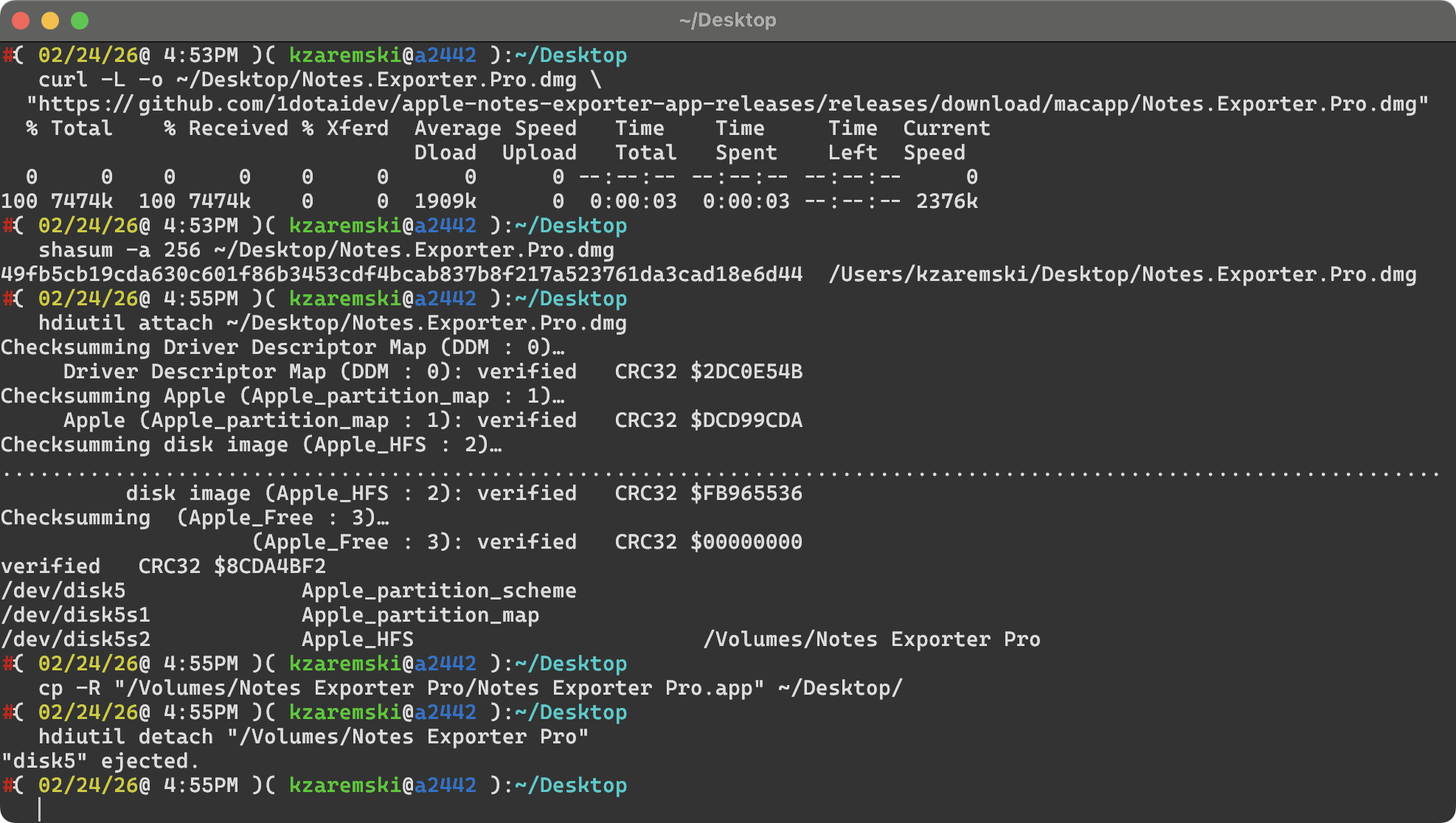
A .app on macOS is just a directory. I started by downloading the DMG, hashing it, mounting it, and copying the app out for analysis.
curl -L -o ~/Desktop/Notes.Exporter.Pro.dmg \
  "https://github.com/1dotaidev/apple-notes-exporter-app-releases/releases/download/macapp/Notes.Exporter.Pro.dmg"
shasum -a 256 ~/Desktop/Notes.Exporter.Pro.dmg
hdiutil attach ~/Desktop/Notes.Exporter.Pro.dmg
cp -R "/Volumes/Notes Exporter Pro/Notes Exporter Pro.app" ~/Desktop/
hdiutil detach "/Volumes/Notes Exporter Pro"
Then I looked at what was inside:
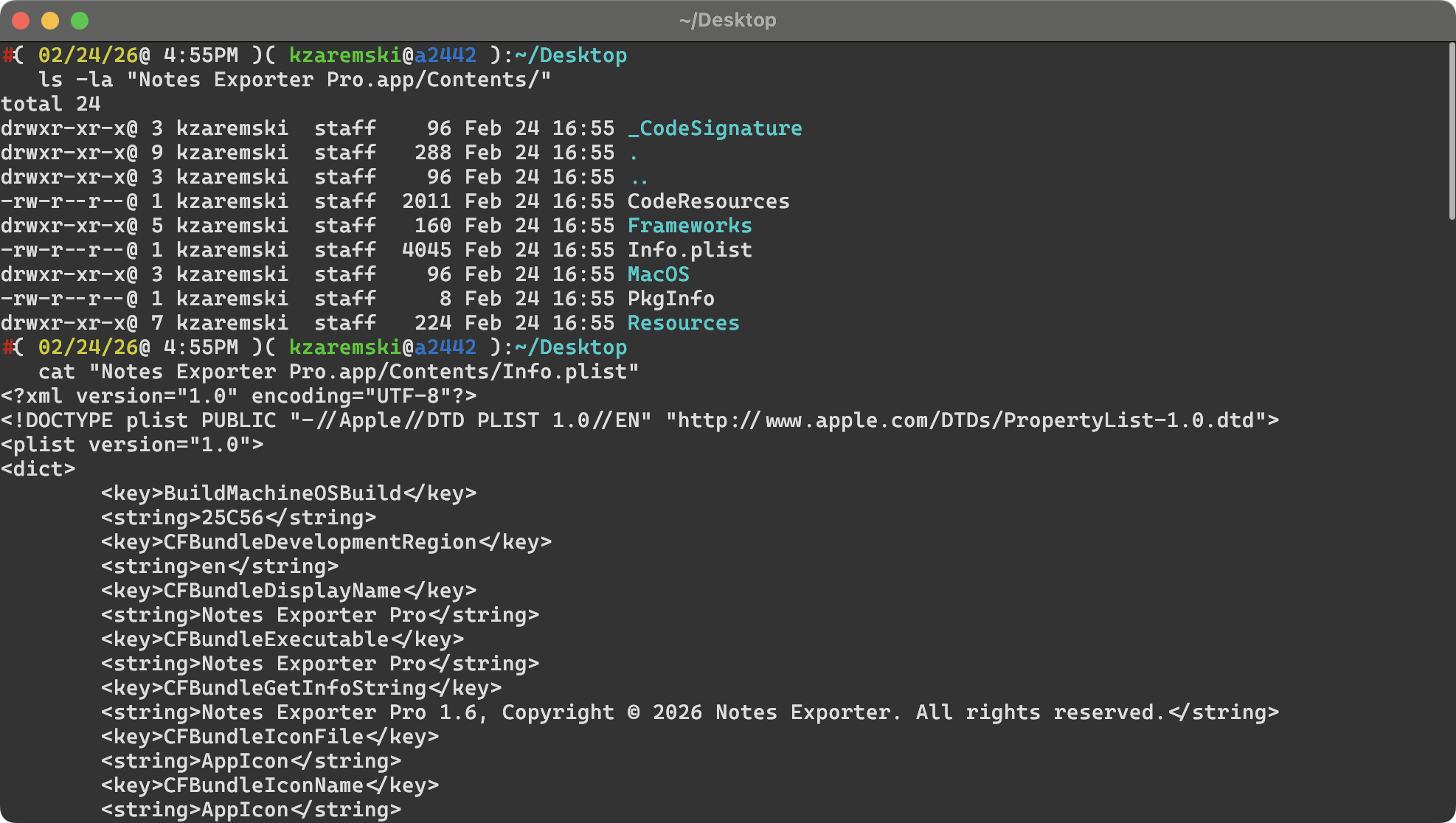
ls -la "Notes Exporter Pro.app/Contents/"
Key directories to check:
Info.plist: app metadata, bundle ID, developer info, versionMacOS/: the actual executable binaryFrameworks/: bundled libraries and dependenciesResources/: assets, localization files_CodeSignature/: code signing data
Step 2: Read the Info.plist
cat "Notes Exporter Pro.app/Contents/Info.plist"
This gave me:
| Key | Value |
|---|---|
CFBundleIdentifier |
onedotai.macosapp.notesexporter |
CFBundleDisplayName |
Notes Exporter Pro |
CFBundleShortVersionString |
1.6 |
CFBundleGetInfoString |
Notes Exporter Pro 1.6, Copyright (c) 2026 Notes Exporter. All rights reserved. |
SUFeedURL |
Sparkle update feed on GitHub (1dotaidev/apple-notes-exporter-app-releases) |
Note the copyright string: “Copyright (c) 2026 Notes Exporter. All rights reserved.” – no mention of me or my license.
Step 3: Check the Code Signature
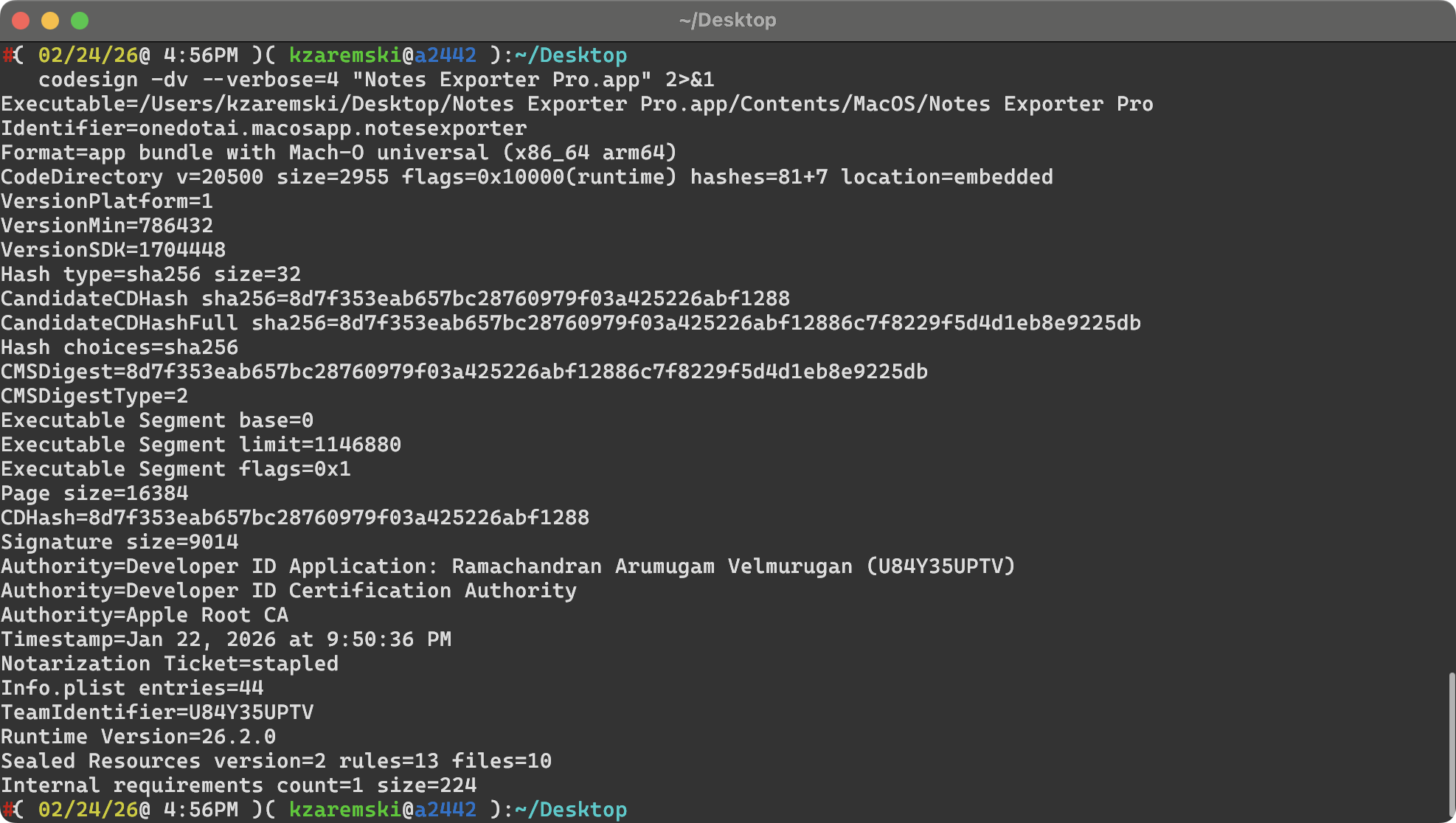
codesign -dv --verbose=4 "Notes Exporter Pro.app" 2>&1
Result:
Authority=Developer ID Application: Ramachandran Arumugam Velmurugan (U84Y35UPTV)
Authority=Developer ID Certification Authority
Authority=Apple Root CA
TeamIdentifier=U84Y35UPTV
Timestamp=Jan 22, 2026 at 9:50:36 PM
Notarization Ticket=stapled
Now I had a real name tied to an Apple Developer account. The binary was signed by Ramachandran Arumugam Velmurugan with Team ID U84Y35UPTV, and Apple had notarized it.
Step 4: Extract and Search Strings
The strings command extracts all readable text from a compiled binary: class names, string literals, SQL queries, error messages, URLs, everything.
strings "Notes Exporter Pro.app/Contents/MacOS/Notes Exporter Pro" > nep_strings.txt
wc -l nep_strings.txt  # 12,214 lines
Searching for my class names
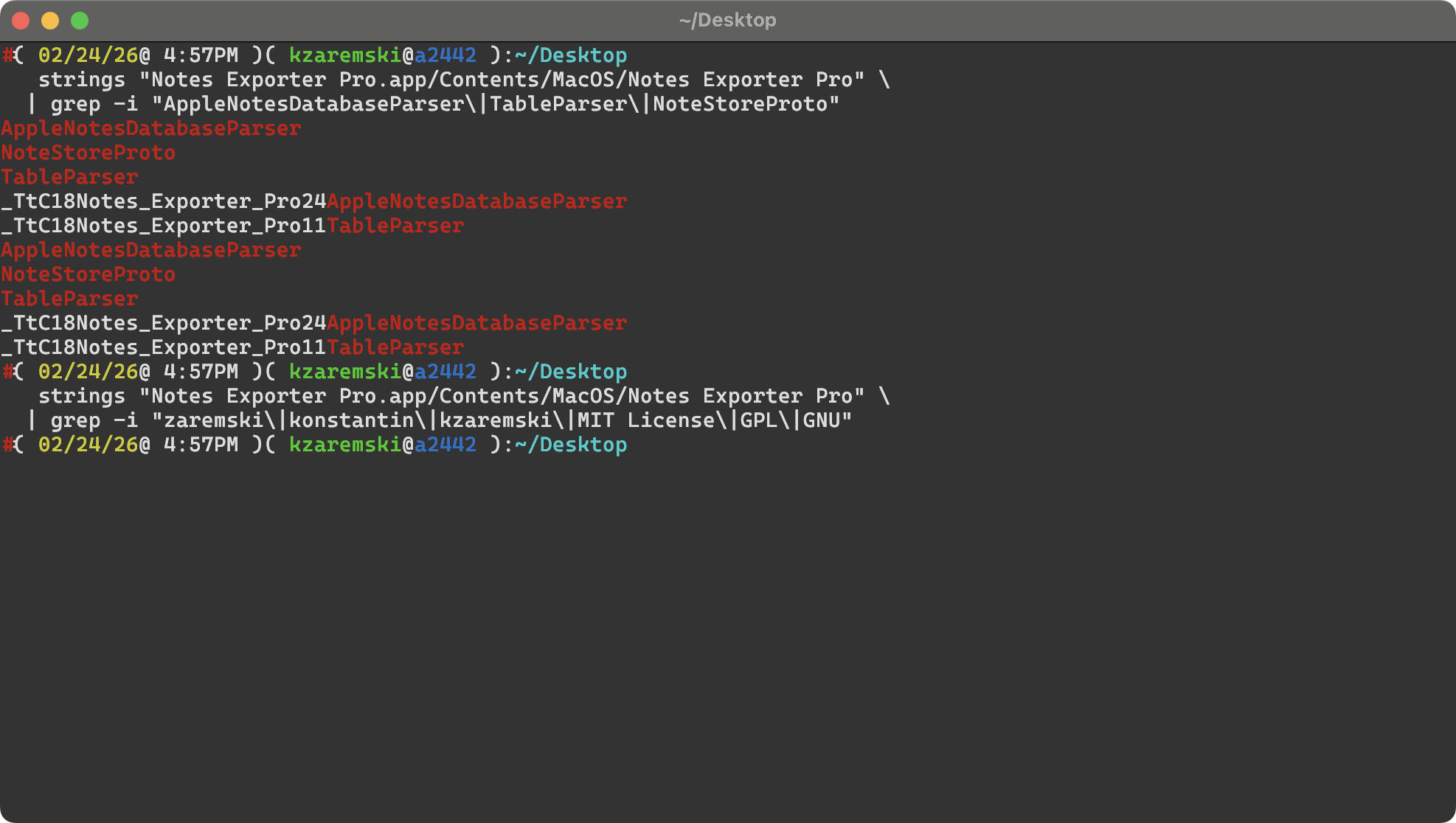
grep -i "AppleNotesDatabaseParser\|TableParser\|NoteStoreProto" nep_strings.txt
AppleNotesDatabaseParser – my custom class for parsing the Apple Notes SQLite database (source, line 145) – was right there in the binary, as a Swift type metadata symbol: _TtC18Notes_Exporter_Pro24AppleNotesDatabaseParser. So was TableParser (source, line 72), my custom class for parsing embedded tables in notes.
These aren’t generic names. I wrote them. Finding them in someone else’s binary is a smoking gun.
Searching for my name or attribution
grep -i "zaremski\|konstantin\|kzaremski\|MIT\|GPL\|GNU" nep_strings.txt
Zero results. No mention of my name, my copyright, or any license text anywhere in the binary.
Searching for my SQL queries
My app queries the Apple Notes SQLite database with specific query patterns. I searched for those:
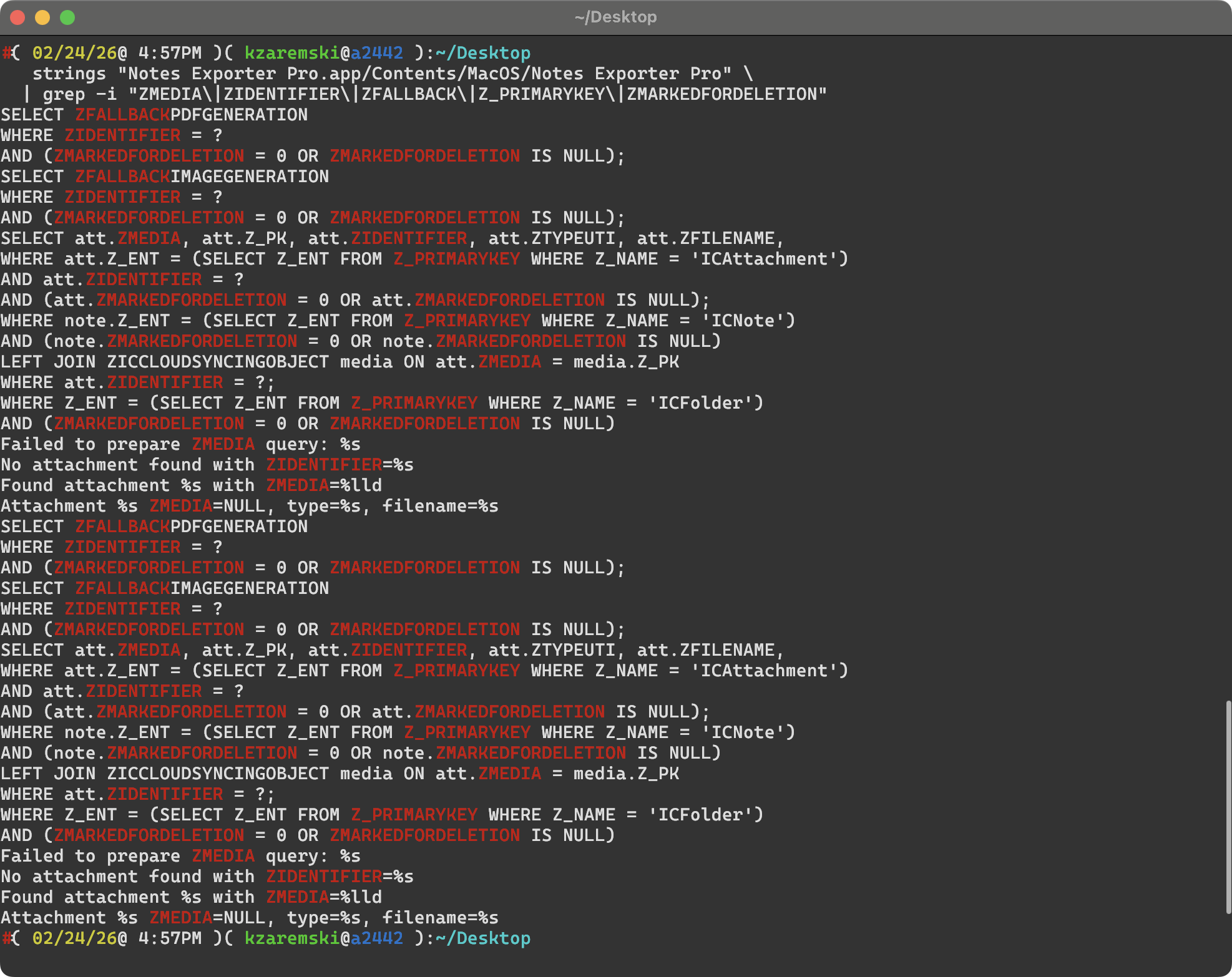
grep -i "ZMEDIA\|ZIDENTIFIER\|ZFALLBACK\|Z_PRIMARYKEY\|ZICCLOUDSYNCINGOBJECT" nep_strings.txt
The same SQL queries from my AppleNotesDatabaseParser.swift were present:
- Attachment query:
SELECT att.ZMEDIA, att.Z_PK, att.ZIDENTIFIER, att.ZTYPEUTI, att.ZFILENAME ...(source, line 966) - Fallback image:
SELECT ZFALLBACKIMAGEGENERATION FROM ZICCLOUDSYNCINGOBJECT WHERE ZIDENTIFIER = ? ...(source, line 1229) - Fallback PDF:
SELECT ZFALLBACKPDFGENERATION FROM ZICCLOUDSYNCINGOBJECT WHERE ZIDENTIFIER = ? ...(source, line 1349) - Media filename:
SELECT ZFILENAME FROM ZICCLOUDSYNCINGOBJECT WHERE Z_PK = ?;(source, line 1032) - Column detection:
PRAGMA table_info(ZICCLOUDSYNCINGOBJECT)(source, line 214)
While the table and column names are Apple’s internal schema (any Notes app would reference them), the specific combination of queries, the Z_PRIMARYKEY subquery pattern for entity type lookups, and the ZMARKEDFORDELETION defensive NULL checks are specific implementation choices from my code.
Searching for my debug strings
Error messages and debug logging are often left unchanged because they don’t face the user:
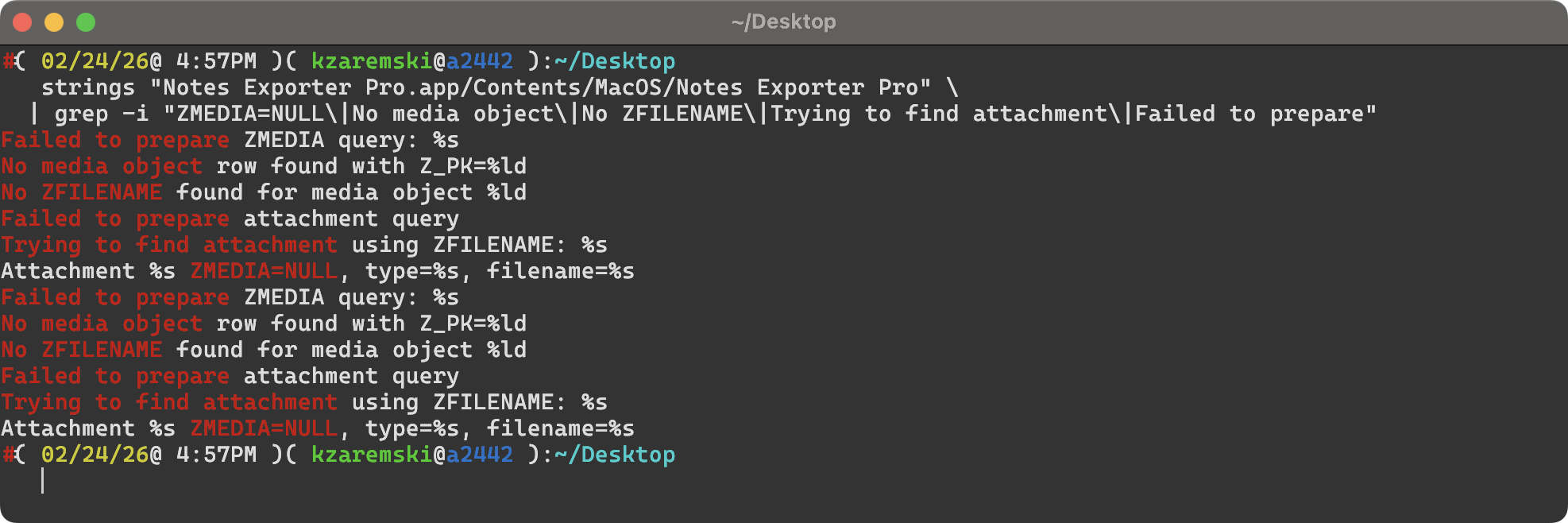
grep -i "ZMEDIA=NULL\|No media object\|No ZFILENAME\|Trying to find attachment" nep_strings.txt
Found exact matches for strings from my AppleNotesDatabaseParser.swift:
| String in Their Binary | My Source |
|---|---|
Attachment %s ZMEDIA=NULL, type=%s, filename=%s |
Line 990 |
Trying to find attachment using ZFILENAME: %s |
Line 1005 |
Found attachment %s with ZMEDIA=%lld |
Line 1014 |
Failed to prepare attachment query |
Line 1022 |
No ZFILENAME found for media object %ld |
Line 1054 |
No media object row found with Z_PK=%ld |
Line 1057 |
Failed to prepare ZMEDIA query: %s |
Line 1061 |
The format strings use C-style %s/%lld (os_log formatting) vs my Swift string interpolation in source, but the message text is identical.
Searching for their infrastructure
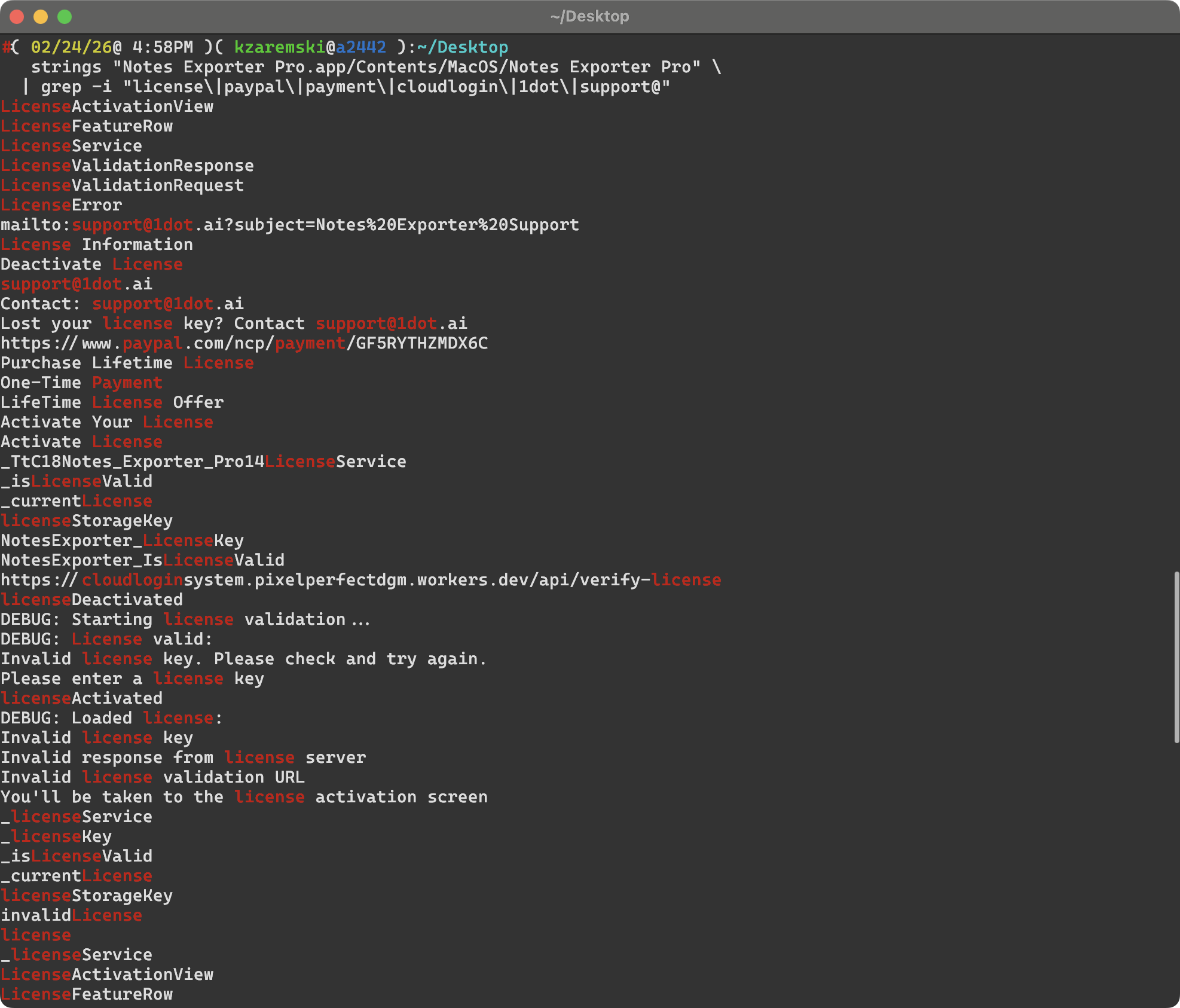
grep -i "license\|paypal\|payment\|cloudlogin\|1dot" nep_strings.txt
This revealed everything they’d bolted on:
- License validation server:
cloudloginsystem.pixelperfectdgm.workers.dev/api/verify-license - PayPal payment:
https://www.paypal.com/ncp/payment/GF5RYTHZMDX6C - Support email:
support@1dot.ai - Sparkle auto-update feed on GitHub
Step 5: Inspect Linked Frameworks
ls "Notes Exporter Pro.app/Contents/Frameworks/"
They were bundling SwiftProtobuf.framework – the same protobuf dependency my project uses to parse Apple Notes’ protobuf-encoded note content. They also bundled Sparkle.framework (auto-updater, not in my project).
otool -L "Notes Exporter Pro.app/Contents/MacOS/Notes Exporter Pro"
The linked system libraries matched my project’s dependency chain: SQLite + Compression + SwiftProtobuf for database parsing, SwiftUI for the interface.
Step 6: Extract ObjC/Swift Class Metadata with otool
This is where it got more interesting. otool -oV dumps Objective-C and Swift runtime metadata, including class names and instance variables (ivars), even when method names are stripped.
otool -oV -arch arm64 "Notes Exporter Pro.app/Contents/MacOS/Notes Exporter Pro" > otool_dump.txt
Instance variable comparison
Their AppleNotesDatabaseParser has exactly 3 instance variables, in the same order, with the same names and sizes as mine (source, lines 146-148):
| # | Their Binary (otool) | My Source |
|---|---|---|
| 1 | db (8 bytes) |
private var db: OpaquePointer? |
| 2 | dbPath (16 bytes) |
private let dbPath: String |
| 3 | version (1 byte) |
private var version: NotesVersion = .unknown |
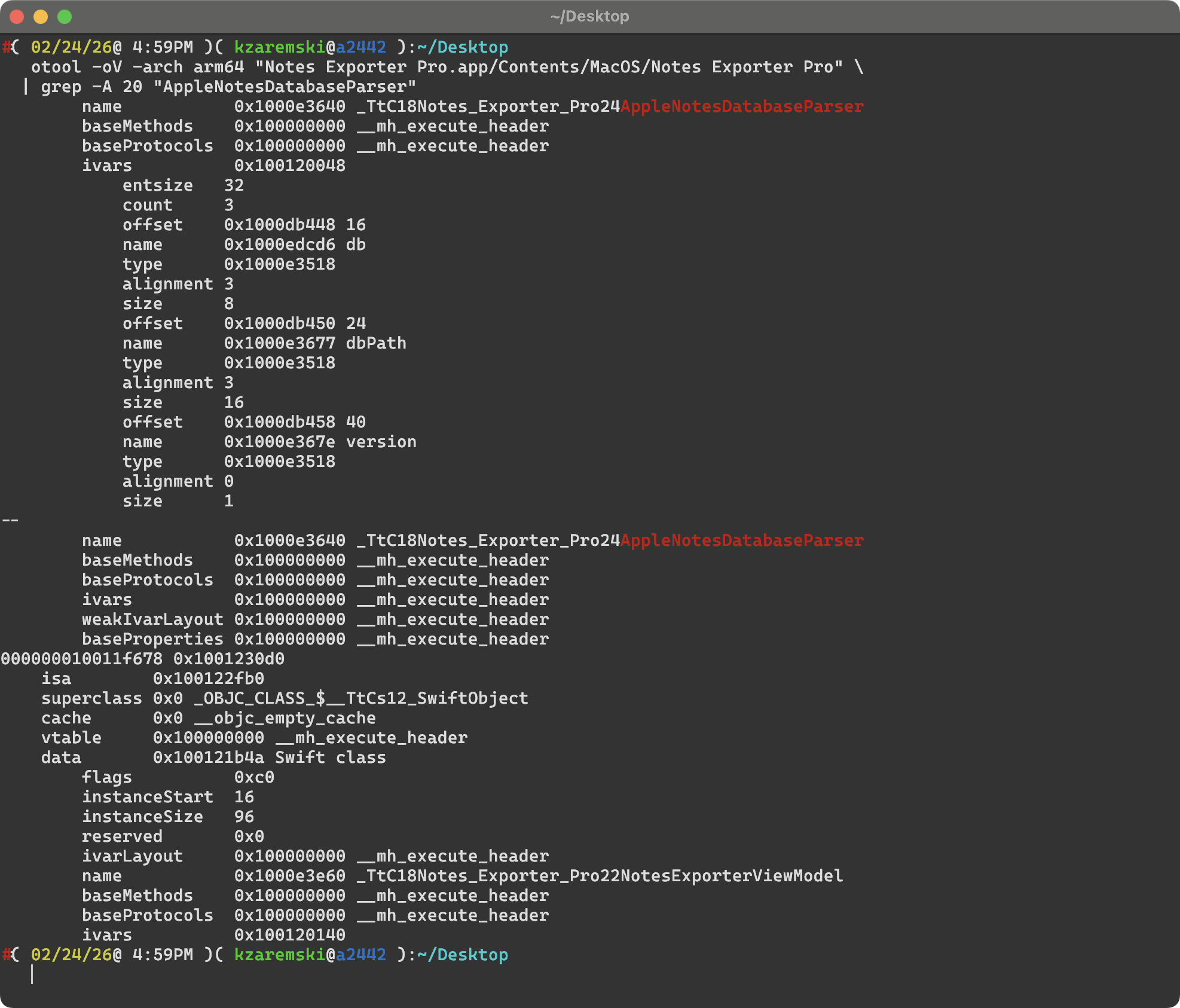
Their TableParser has a single ivar db – exact match to mine (source, line 73).
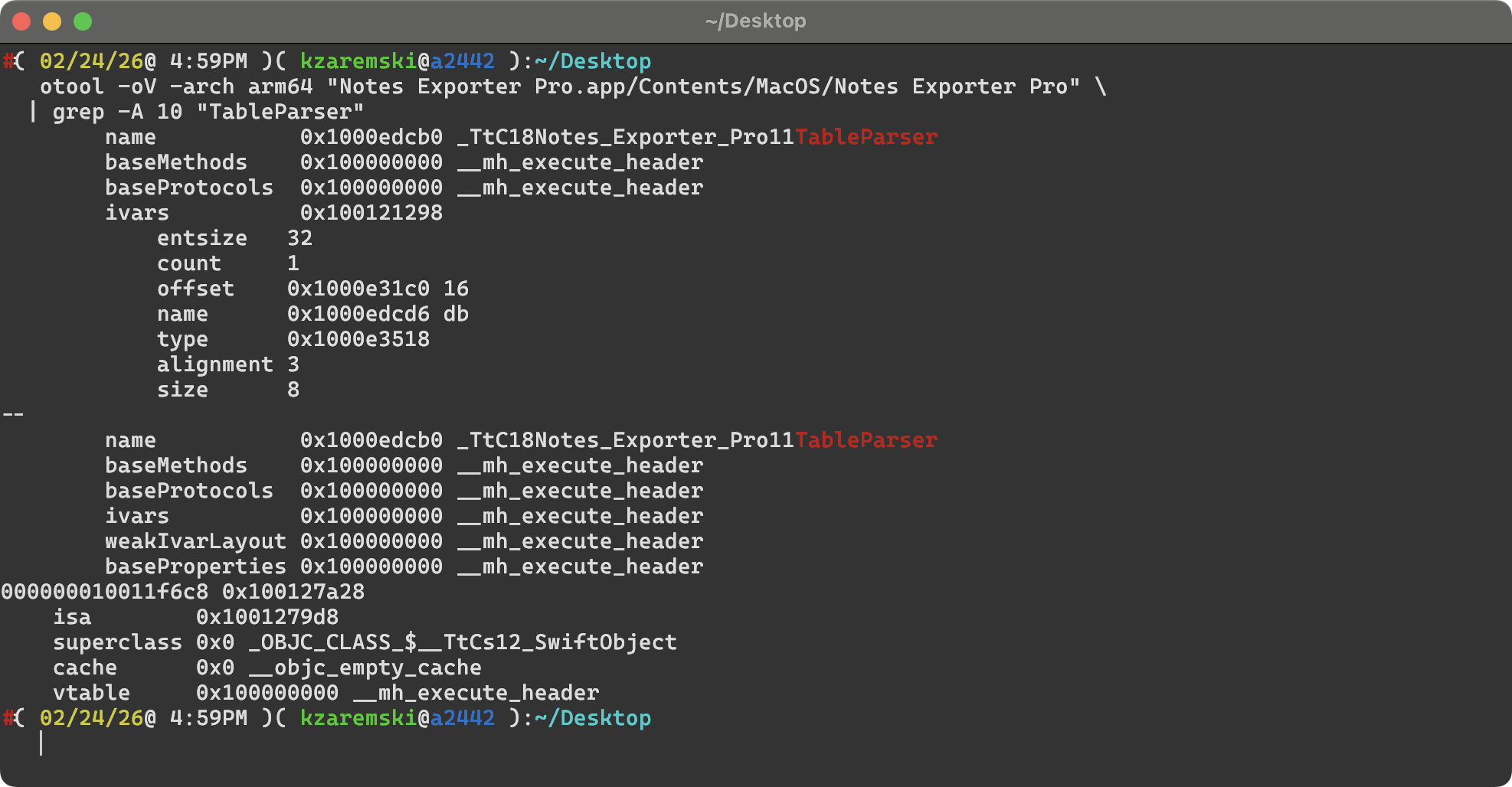
Full class list
The otool dump revealed all Swift classes in the binary. This showed clearly what they took and what they built themselves:
From my project (copied):
AppleNotesDatabaseParser– core database parserTableParser– embedded table parsingAttributeRun._StorageClass– protobuf generated types
Their own additions:
NotesExporterViewModel(43 ivars – substantially different from myExportViewModel)ExportManager,DatabaseNotesManager,NotesManager– their service layerLicenseService– paywallStoreManager– StoreKit integrationUpdaterManager– Sparkle auto-updateZipExporter,NavigationHandler,ProgressTracker
Their main view model alone had 43 instance variables including auto-export features, iCloud warnings, and StoreKit state that don’t exist anywhere in my code. This confirmed: they took the core database parsing engine and built a new app shell around it.
Step 7: Ghidra Decompilation
This is where I got the strongest evidence. Ghidra is a free reverse engineering framework from the NSA that can decompile compiled binary code back into readable pseudocode.
I installed Ghidra via Homebrew and ran the headless analyzer:
brew install ghidra

# Extract the arm64 slice
lipo -thin arm64 "Notes Exporter Pro" -output nep_arm64

# Import and analyze
analyzeHeadless /tmp/ghidra_project NEP_Analysis -import nep_arm64
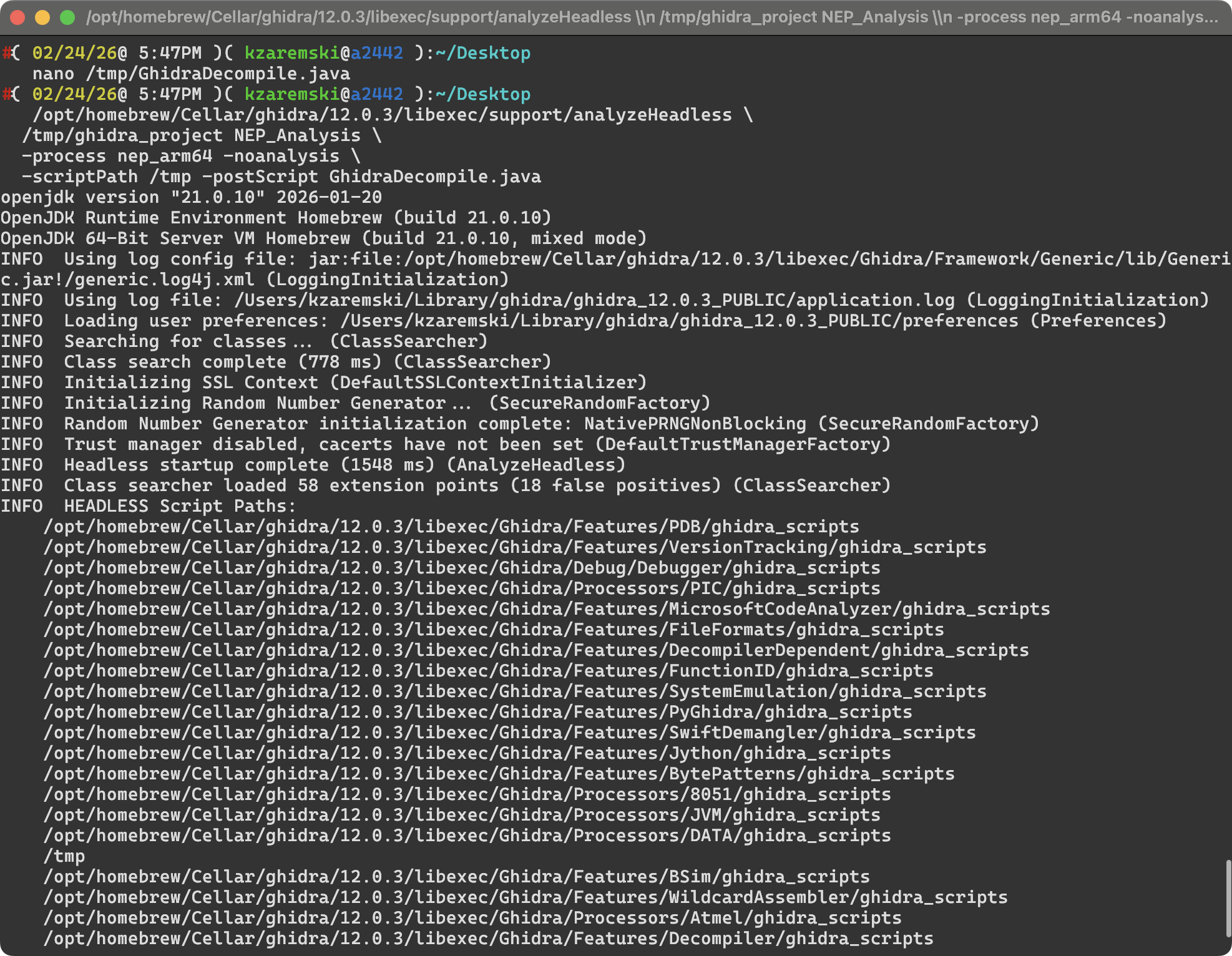
Then I wrote a custom Ghidra plugin to decompile all 4,188 functions and filter for ones that reference strings from my source code. 15 functions matched. Due to symbol stripping, function names appeared as FUN_XXXXXXXX, but the decompiled pseudocode revealed complete control flow, string constants, and API call sequences.
Attachment resolution: step-by-step control flow match
This is the key comparison. My fetchAttachmentData function (source, lines 963-1025) follows a specific 12-step sequence. Their decompiled function (FUN_100003e8c) follows the exact same sequence:
| Step | Their Function (Ghidra pseudocode) | My Function (Swift source) |
|---|---|---|
| 1 | Prepare SQL with same attachment query | Prepare SQL with same query |
| 2 | Bind attachment identifier as text | Bind attachment identifier |
| 3 | Step through results | Step through results |
| 4 | Read columns 3, 4, 5 (ZTYPEUTI, ZFILENAME, account) | Read same columns |
| 5 | Check if column 0 (ZMEDIA) is SQLITE_NULL (type == 5) | Check for SQLITE_NULL |
| 6 | If NULL: log "Attachment %s ZMEDIA=NULL..." |
If NULL: log same message |
| 7 | Check UTI for com.apple.paper, call fallback image |
Check UTI, call fetchFallbackImage |
| 8 | Check for PDF type, call fallback PDF | Call fetchFallbackPDF |
| 9 | Try ZFILENAME: log "Trying to find attachment..." |
Log same, call findExternalAttachment |
| 10 | If ZMEDIA not null: log "Found attachment...ZMEDIA=%lld" |
Log same, call fetchMediaData |
| 11 | If no rows: log "No attachment found..." |
Log same message |
| 12 | If prepare fails: log "Failed to prepare..." |
Log same message |
Every branch, every error path, every log message at every decision point – identical.
Media data fetch: 1:1 copy
Their FUN_1000048bc decompiles to the exact same logic as my fetchMediaData (source, lines 1030-1065):
- Same SQL:
SELECT ZFILENAME FROM ZICCLOUDSYNCINGOBJECT WHERE Z_PK = ?; - Same bind, same step, same column read
- Same log:
"Media object %ld: filename=%s" - Same three error paths with the same three messages
Fallback image/PDF resolution
Their fallback functions use the same SQL queries for ZFALLBACKIMAGEGENERATION (source, line 1229) and ZFALLBACKPDFGENERATION (source, line 1349), the same NSHomeDirectory() call, and construct the same candidate paths: group container + /Accounts/ + account ID + /FallbackImages/ (source, lines 1247-1248).
Column detection
Their decompiled code shows a function that calls PRAGMA table_info() and checks for columns named ZOWNER, ZACCOUNT, ZTITLE2, ZTITLE1, ZTITLE with fallbacks – the same approach as my getTableColumns function (source, lines 212-230).
The hex-encoded strings in the decompiled output (0x52454e574f5a = ZOWNER, 0x544e554f4343415a = ZACCOUNT) confirmed this.
One notable difference: their fetchAttachmentData query hardcodes note.ZACCOUNT as ZACCOUNT in a two-table join, which matches my code at the v1.0-3 tag. I have since replaced that with dynamic column detection and a three-table account join in commit 0626d94 (view). Their binary carries the older version, including a bug where the hardcoded column returns NULL on modern macOS versions. This suggests they forked my code at or around the v1.0-3 release.
What They Took vs. What They Built
The evidence paints a clear picture of what happened:
Taken from my project:
AppleNotesDatabaseParser– the entire SQLite query pipeline, attachment resolution, fallback handling, column detectionTableParser– embedded table parsing- The protobuf schema and Swift-generated types for decoding note content
- All the trial-and-error knowledge encoded in the debug strings and edge-case handling
Built by them:
- New UI/ViewModel layer (NotesExporterViewModel with 43 ivars)
- License key paywall + PayPal payment
- Auto-export/scheduled backup feature
- Additional export formats (DOCX, EPUB, ZIP)
- Sparkle auto-updater
- AppleScript fallback export method
- iCloud sync warning UI
They took the engine and built a new car body around it, then slapped a $9.99 price tag on it.
What I Investigated But Found NOT to Be Evidence
Honesty matters. I investigated several things that turned out not to be evidence of copying:
- AppleScript delimiter patterns (
:::,|||,;;;,@@@,~~~) – not in any version of my code; their own work - Description text (“export notes from Apple’s Notes.app to Markdown and HTML”) – similar but not verbatim from my README
- UI strings (“Transform your Apple Notes…”, iCloud warning) – not in my source code
- Some SQL differences (
LEFT JOIN ... media ON att.ZMEDIA = media.Z_PK) – not in my code; their modifications - Class names
DatabaseNotesManager,ExportManager,NavigationHandler,generatePDFWebKit– their own classes NotesExporterViewModel(43 ivars) – substantially different from myExportViewModel
I corrected these during the investigation to ensure every claim in this post is verified against actual source code.
The License Violation
At the time the code was taken, Apple Notes Exporter was licensed under the MIT License. The MIT License has one condition:
“The above copyright notice and this permission notice shall be included in all copies or substantial portions of the Software.”
A grep for “zaremski”, “konstantin”, “MIT”, “GPL”, “license”, or “copyright” across their entire binary and app bundle returned zero results. They replaced my copyright with:
Copyright (c) 2026 Notes Exporter Pro. All rights reserved.
By stripping my copyright notice and license text, they violated the one condition of the MIT License, which means their right to distribute the code under those terms was never validly established.
I have since relicensed the project to GNU GPL v3, which requires derivative works to also be open source and provide corresponding source code. Going forward, anyone who takes code from my repository must keep it open source.
Their Marketing
The app was promoted by Reddit user /u/Ok-Organization5910 across at least six subreddits (r/macapps, r/AppleNotesGang, r/SideProject, r/MVPLaunch, r/founder, r/1dotaimacosapps) with claims like:
- “After spending 6 hours trying to manually export my notes, I decided to build a solution”
- “I spent the last few months building Apple Notes Exporter Pro”
The core of the “solution” they “built” is my database parser that I spent years developing.
Preserving Evidence
Before doing anything public, I preserved everything:
- Kept a copy of their .app bundle untouched, with SHA-256 hash recorded
- Saved the full strings dump (12,214 lines)
- Saved the full Ghidra decompilation output of matching functions
- Web-archived their website, payment pages, and GitHub releases repo
- Screenshotted Reddit posts with timestamps
- Archived my own git log as a timeline reference:
git log --all --format='%H %ai %an %s' > git-history-evidence.txt
What You Can Do If This Happens to You
- File a DMCA takedown on any platform hosting their content (GitHub, Reddit, web hosts)
- Report to Apple if they’re distributing via a Developer ID – include their Team ID
- Contact their payment processor (PayPal, Stripe, etc.) to report them profiting from infringing software
- Public disclosure with verified evidence
- Email them directly demanding compliance or removal
A Note on License Choice
If you’re publishing open-source software and don’t want someone to repackage it as a closed-source paid product, think carefully about your license:
- MIT/BSD: Anyone can use, modify, sell. Only requirement is attribution. If they strip your name, they’re in violation, but enforcement is on you.
- GPL v3: Derivative works must also be open source with source code provided. A paywall on a closed binary is inherently non-compliant.
- AGPL: Same as GPL but also covers network/SaaS use.
- Dual license: Free for open-source, paid license for commercial use.
I learned this the hard way. Going forward, my project is GPL v3.
Summary of Evidence
| Evidence Type | Tool Used | Finding | Source Reference |
|---|---|---|---|
| Class names | strings |
AppleNotesDatabaseParser, TableParser in binary type metadata |
L145, L72 |
| Instance variables | otool -oV |
Identical ivar layout (names, order, sizes) for both classes | L146-148, L73 |
| SQL queries | strings |
Same attachment, fallback, and column detection queries | L966, L1229, L1349 |
| Debug strings | strings |
7 identical error/log messages with matching format strings | L990, L1005, L1014, L1054, L1057 |
| Control flow | Ghidra | 12-step attachment resolution pipeline is structurally identical | L963-1025 |
| Media fetch | Ghidra | fetchMediaData equivalent is a 1:1 copy |
L1030-1065 |
| Fallback handling | Ghidra | Same SQL, same NSHomeDirectory() path construction |
L1226-1270, L1247-1248 |
| Column detection | Ghidra | Same PRAGMA table_info() approach, simpler (pre-v1.1) version |
L212-230 |
| Attribution | strings |
Zero matches for author name, copyright, or license text | – |
Forensic analysis performed on February 24, 2026.
Independent verification: The DMG analyzed was downloaded from https://github.com/1dotaidev/apple-notes-exporter-app-releases/releases/download/macapp/Notes.Exporter.Pro.dmg. Anyone can download it and reproduce these findings using the tools described above.
Notes.Exporter.Pro.dmg
SHA256 49fb5cb19cda630c601f86b3453cdf4bcab837b8f217a523761da3cad18e6d44
Notes Exporter Pro (binary)
SHA256 149bada63a27a4ef1e1a1fefc6c0f219ff78f0157be947539d968cc11c636d88
The original project: github.com/kzaremski/apple-notes-exporter
I’ll update this post as things develop.